
How To Create a GSA Search Engine Ranker Project Template
I have been asked by many people if i can create a GSA template for them. But as the saying goes “give a man a fish and you feed him for a day, but teach him how to fish and you feed him for a lifetime”, the same goes for me just giving you a template. Today i will teach you how to create your very own custom GSA Search Engine Ranker project template
Those with you now familiar with what a exactly a GSA Search Engine Ranker project template is, i will explain for you below why or when you need a GSA Search Engine Ranker project template and what it does.
[spacer height=”2px”]
[full_width][one_half padding=”0 0 10px 0″]
Why do you need a GSA Search Engine Ranker project template
[spacer height=”2px”]
Some people like myself whom create 100's of GSA Search Engine Ranker projects each month, usually will use the same platforms, same filters, same option selections, and some people even use the same catch all email account, when they create a projects.
So every time we create a project we will need to check all the boxes, select the same filters, change the same options, and so on, this end up being really time consuming and possibility of making mistakes are high.
[/one_half][one_half padding=”0 0 0 10px”]
What does a GSA Search Engine Ranker project template do for you
[spacer height=”2px”]
 The main thing that a GSA Search Engine Ranker project template does is that it save you allot of time, as you can just import your template and all the settings and filters will be there.
GSA Search Engine Ranker project template can prevent mistakes or you having forgotten to check a option or filter.
GSA Search Engine Ranker project ensures consistency in project creation
[/one_half][/full_width]
Watch the below video showing how we create a GSA Search Engine Ranker project template from start to finish, or follow the simple steps further down below the video
[sociallocker]
How To Create a GSA Search Engine Ranker Project Template
[/sociallocker]
[spacer height=”2px”]
Follow these steps to create a GSA Search Engine Ranker project template
[spacer height=”2px”]
- Start a new project like you would normally do.
- Select all the platforms where you want to submit to
- Decide on a word that we can use as a marker, something like : mytesttemplate ( this is just so we can later easy find the fields and delete the marker)
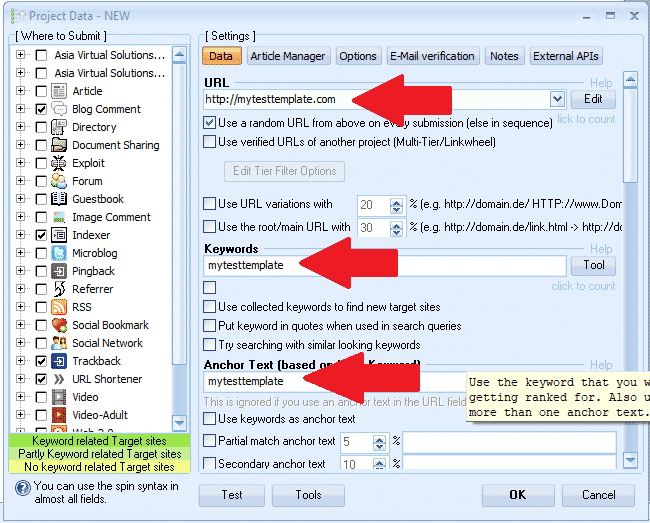
- Enter a url : http://mytesttemplate.com
- Next replace all the blank fields wi your marker text: mytesttemplate, it should now look like the below screenshots

[spacer height=”2px”]
- If you have selected the platform Documents, then you will need to attach a PDF document — don't just paste; mytesttemplate for document, just browse and select any PDF — don not worry we will delete that PDF again later in the process.
- If you have selected a platform that need a profile image — don't just paste; mytesttemplate for the image, just browse and select any image — don not worry we will delete that image again later in the process.
- Once you have completed all of the fields under the Data Tab, then move to the : ARTICLE MANAGER tab.
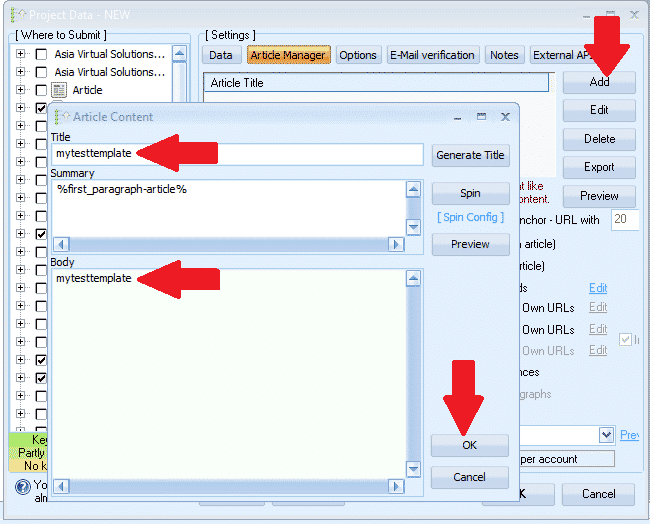
- Click ADD and then select ENTER MANUALLY
- Article Title, paste in: mytesttemplate
- Article Body, paste in: mytesttemplate
- Now click OK
- Next we move to the OPTIONS tab
- Make all your selections, and set your filters. Thats all nothing else to do on Options tab.
- Next move to the EMAIL tab
- Delete the default email you see there, and then click ADD
- Select MANUALLY
- Enter the email as follow : my************@************te.com and click OK
- Now delete the first email the show <Edit Me> — you should only see the email we just added; my************@************te.com
- Click on your email, and then where it show POP3 Server: fill in mail.mytesttemplate.com
- Fill PASSWORD as : mytesttemplate
- Your email fields should now look like the below screenshot:

[full_width][one_third]Great job so far, we are now done with our settings and now all you need to do is click OK to save the project. When you click OK, it is going to give you the warning you see over on the right hand side. That is not a problem, simply click IGNORE and your project will now be saved[/one_third][two_third_last]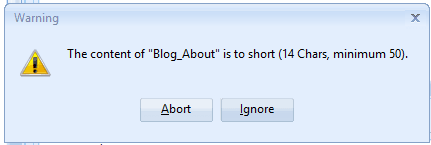 [/two_third_last][/full_width]
[spacer height=”2px”]
Right we have now created our project and saved it, but don't get excited yet, we are not done yet, there are still some more steps before our GSA Search Engine Ranker project template is completed, so let's continue with the remaining steps.
[full_width][one_third]
- Now double click on the project to open it up again.
- Next at the bottom of the GSA Search Engine ranker Window, click on TOOLS, and then on EXPORT, at TEMPLATE (Options, Data Fields, Engine Selection )
- Save the File in a folder where you intend to keep all your GSA Search Engine Ranker project templates. The file name would be something like this : MyTier1Template.gsatml
[/one_third][two_third_last]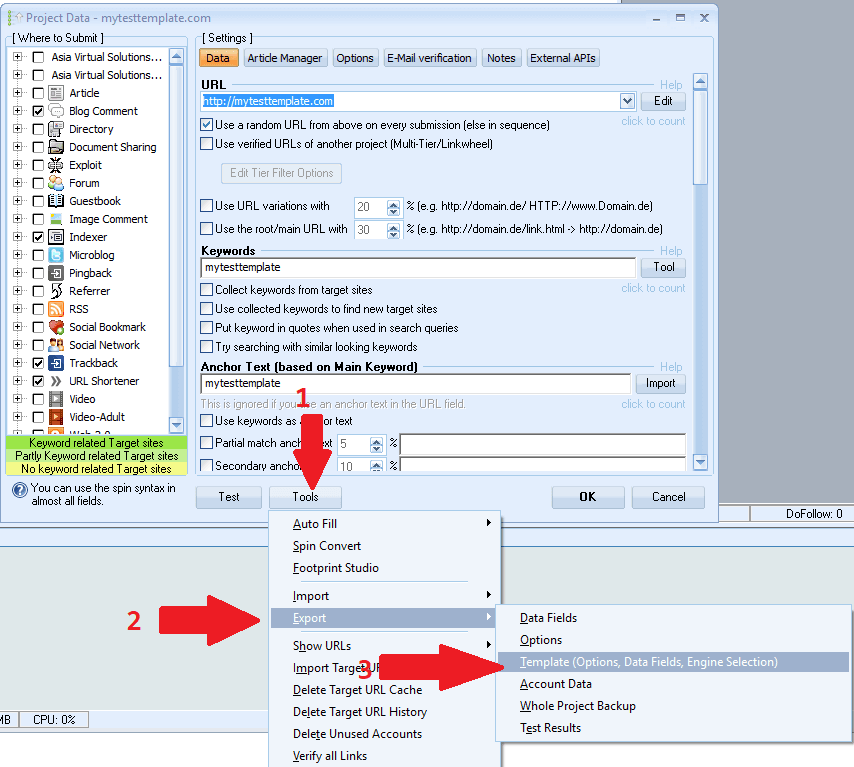 [/two_third_last][/full_width]
[spacer height=”2px”]
OK so now we have created our project file and we have exported it, next we are going to go edit that project we have exported. At this time we are done with Tagapagraranggo ng Search Engine ng GSA for now. You can Delete the project you have in there and close GSA SER we will use it a little later again.
Lets get started with editing the exported file, for this we will need a editor like NOTEPAD++, you can download it for free from here : https://notepad-plus-plus.org/downloads/
- First i need you to go and open the folder where you exported the project too.
- You will note that there are now 2 files in that folder, the one will end with .articles and the other will end with .gsatml
- We do not need the one that ends with .articles, so you can just delete that file.
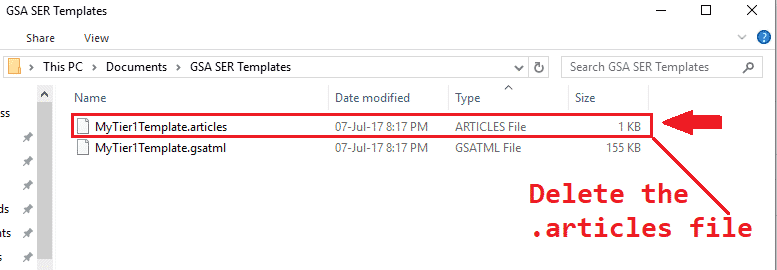
- Next step is to right click on the file that ends with .gsatml, in my case the file is MyTier1Template.gsatml
- The select EDIT WITH NOTEPAD++ This will now open the file for you in Notepad++ and we can start working on it.
- The 2nd line will be the URL we specified when we created it in GSA Search Engine Ranker, in my case it looks like this : URL=http://mytesttemplate.com
- You now need to delete the URL, so all you should have is : URL=
- Now on the menu bar of NotePad++, select SEARCH and then scroll down and select REPLACE
- In the REPLACE window that popped up you need to type in the marker word you used when you created your GSA Search Engine ranker project, in my case it was mytesttemplate, Fill in like this : Find What: =mytesttemplate and replace with: = Then hit the REPLACE ALL button
- It should look like the below screenshot:

Great so what before was showing =mytesttemplate should now be only: =
- Next you want to scroll down and look for the pdf file that you have added to Document, when you created the project. It will say Document=c://file to your pdf
- Remove the file path to the domain, so it only show : Document=
- Next we need to remove all the email entries: The easiest and fastest way to do this way is with the FIND tools — To load it, with Notepadd++ open press CTR+F
- Find what you need to again enter your marker phrase, mine was : mytesttemplate
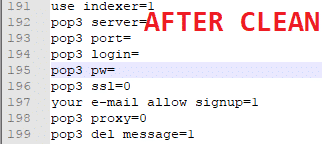
- Now click next and it will show you the first entry, replace everything after: = ( we only want the =) You can also clear the entire password. Below is the before and after clean screenshot.
- Ok we are all done, now, save the the file and thats it, your template is ready.

[spacer height=”2px”]
How to use your GSA Search Engine Ranker project template
[spacer height=”2px”]
Using the template is very easy, just follow the below few steps.
- IN GSA Search Engine Ranker click: New to start a new project.
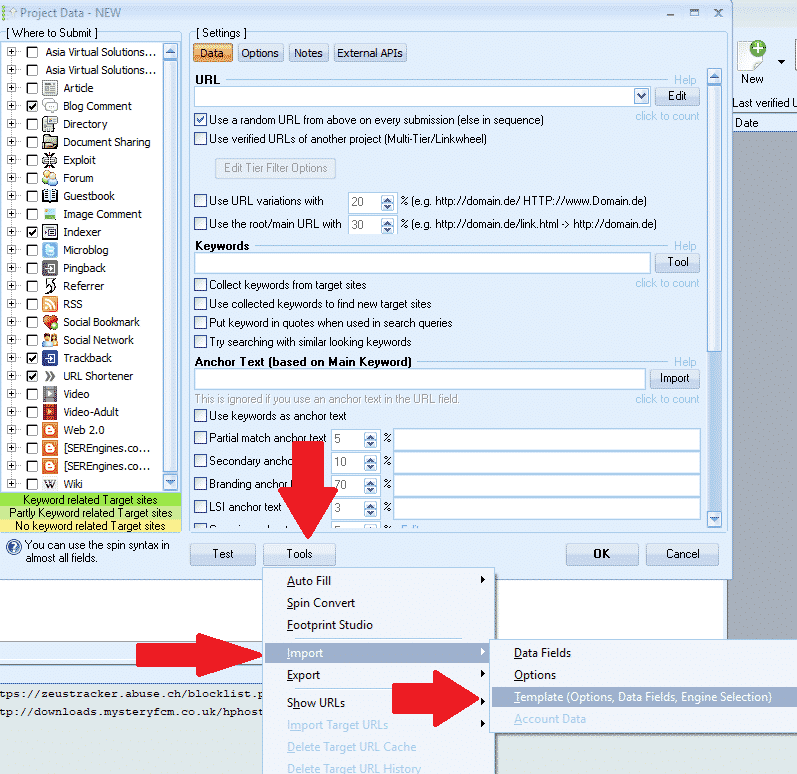
- Then at the bottom of the GSA Search Engine ranker window, click on Tools Import TEMPLATE (Options, Data Fields, Engine Selection )
- Browse to where your template has been saved and then select it.
[spacer height=”2px”]
That is it you have now successfully created a template and import it , all you now need to do is to add content.
I hope you enjoyed the post and the video, if you benefited from the post, then please like and share it, and please leave a comment if you have any questions.
TOO LAZY TO CREATE A GSA SER TEMPLATE
Let us create your project for you – fully created tiered GSA SER projects