• Tungkol sa Amin
    • Mag-ambag o Makipagtulungan sa Asia Virtual Solutions
  • Mga Kaakibat
  • Makipag-ugnayan sa Amin
  • Aking Account
  • Portal ng Suporta
Mga Virtual na Solusyon sa Asya:
  • Tahanan
  • Tagapagraranggo ng Search Engine ng GSA
    • Mga Madalas Itanong (FAQ) para sa GSA Search Engine Ranker
    • Mga Kagamitan at Add-On ng GSA SER
    • Mga Gabay sa Pagraranggo ng Search Engine ng GSA
    • Gabay sa Pagbasag ng Captcha ng GSA
    • Pagho-host ng GSA
  • Blog
    • Paglutas ng Captcha
    • Paglikha ng Nilalaman
    • Pag-scrape ng Nilalaman
    • Pag-ikot ng Nilalaman
    • Mga Tutorial at Gabay sa Pagbuo ng Link sa GSA Search Engine Ranker
    • Mga Serbisyo sa Pagho-host ng VPS
    • Mga Tutorial sa Robot ng Pera
    • Paano
    • Balita sa mga Virtual na Solusyon sa Asya
    • Mga Inirerekomendang Review ng SEO Software
    • Pagmemerkado sa Web
    • Xrumer & Xevil Techniques & Tutorials
  • Tindahan
    • Mga Artikulo sa Nilalaman at AI
    • Mga Kagamitan at Add-On ng GSA SER
    • Mga Serbisyo sa Pagho-host
    • Mga Serbisyo sa Pagbuo ng Link
    • Tagapagsumite ng Robot ng Pera
    • RankerX
    • Mga Inirerekomendang Serbisyo
    • Mga Serbisyo sa Social Media
    • Mga Serbisyo ng Xrumer
Walang Resulta
Tingnan ang Lahat ng Resulta
Asia Virtual Solutions: Ekspertong GSA SER at Digital Marketing

Tahanan » Blog » Learn Simple Steps How To Correctly Use GSA Global Site List

Learn Simple Steps How To Correctly Use GSA Global Site List

Michael Swart ni Michael Swart
22 Hunyo, 2018 - Updated on 20 Pebrero, 2026
sa Contextual Links, Bidyo
0
Learn simple steps to use gsa global site list
Talaan ng mga Nilalaman palabas
1 Learn Simple Steps How To Correctly Use GSA Search Engine Ranker Global Site List
1.1 Where are the global site list and what is it used for?
1.1.1 Where are the global site list:
1.1.2 What are the GSA SER global site list used for:
1.2 What are those checkboxes next to the Identified, Submitted, Verified and Failed Options?
1.2.1 The Identified Checkbox :
1.2.2 The Submitted Checkbox:
1.2.3 The Verified Checkbox:
1.2.4 The Failed Checkbox:
1.3 What are the 4 file paths next to each option of the GSA SER Global site list?
1.4 How to use paid link list shared via Dropbox from several providers, as well as your own list?
2 GSA Search Engine Ranker – How To Use Multiple GSA SER Link List at Same Time
2.1 How do you set your GSA Search Engine Ranker projects to use the global site list
3 How to use GSA Search Engine Ranker Global Site List in Your GSA SER Projects
3.1 What is the difference between GSA Search Engine target URLs and the global site list.
3.1.1 GSA Search Engine Ranker global site list
3.1.2 GSA Search Engine Ranker target URLs
3.1.2.1 How to import GSA Search Engine Ranker target URLs
4 Asia Virtual Solutions – GSA SER Global Link List

Learn Simple Steps How To Correctly Use GSA Search Engine Ranker Global Site List

GSA SER global site list is one of the main things we have noticed that more than 75% of all GSA Search Engine Ranker users  don't fully understand and get wrong when they set up their GSA Search Engine Ranker. How do we know this I hear you ask. We can see the GSA SER settings from the 50+ users using our GSA SER VPS service, and we hear the questions people ask when they purchase our GSA SER Link List and GSA Search Engine Ranker data packs.

So I have decided it is time to create a post on the topic of GSA SER Global Site List, to help people better understand what the Global Site list are and how to use the list correctly.


Where are the global site list and what is it used for?

Where are the global site list:

The global site list can be found if you  click on OPTIONS  tab in the main screen, and then under the ADVANCED tab, as is shown in the below screenshot.

By default the the list are saved in your APPDATA folder, but this location can be changed to wherever you want to keep it.
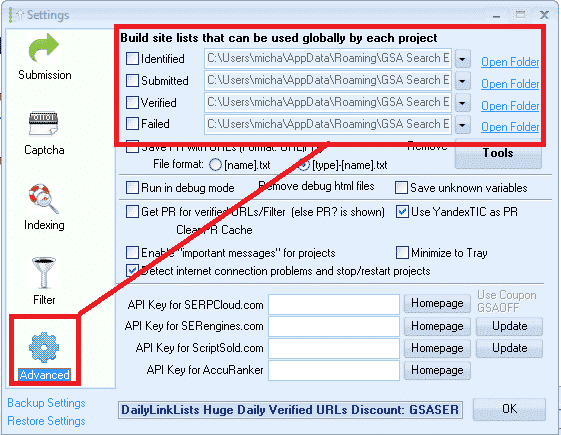
GSA SER Global Site List Location


What are the GSA SER global site list used for:

Global site list are link targets where GSA SER post to too, to create your backlinks.

When you first buy Tagapagraranggo ng Search Engine ng GSA the list will be all empty, and you can import links into the list by using the built in scraper in the projects, or by importing list via the TOOLS menu, or you make used of paid list via a shared folder such as Dropbox.

When creating a new GSA project you have the option to use the Global Site List to post to, as in the below screenshot.
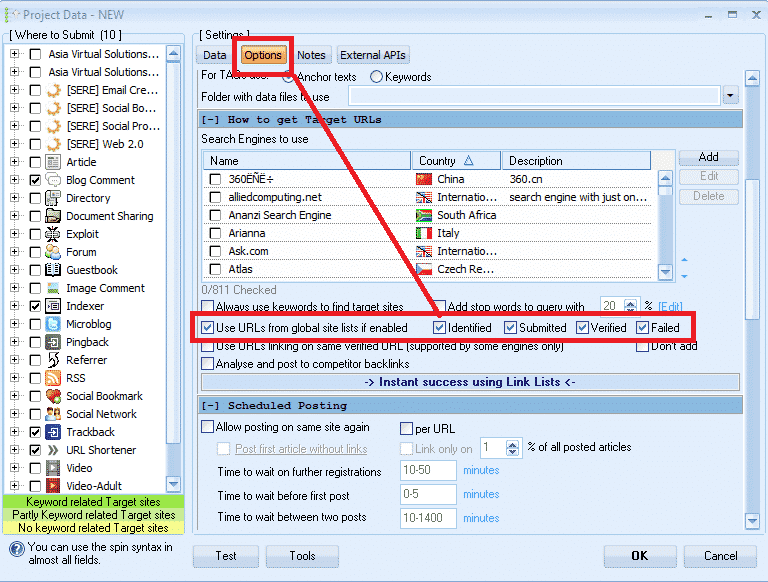
 

Select GSA Global Site List in a Project

What are those checkboxes next to the Identified, Submitted, Verified and Failed  Options?

PAY ATTENTION HERE – THIS IS THE NO.1 THING THAT 75% OF GSA SER USERS GET  WRONG

What I have seen is that most users are not really sure what those checkboxes are for, and most think that it is the option to select to use the list or not so they just go and check all the boxes, which is wrong, it has nothing to do with selecting to use or not use the list.
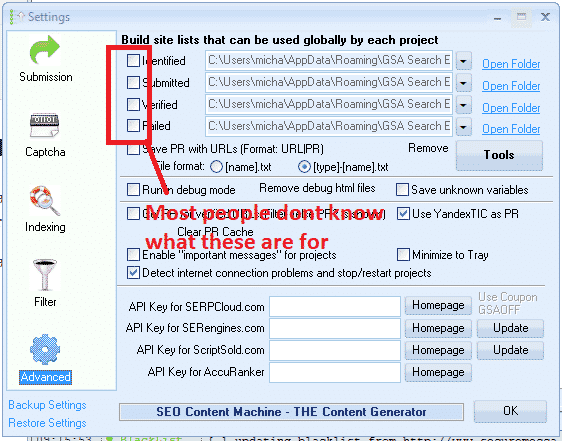
 

What are the global site list check boxes


What those checkboxes actually do is to enable or disable write permissions  to write to the list.


The Identified Checkbox :

If you use the search engines option in your projects to scrape, then it will add the scraped urls in this list

The Submitted Checkbox:

Every time GSA SER submit in any of your projects to a site, it will add the site it submitted to, to this list

The Verified Checkbox:

Every time GSA Verify a link that it has posted in any of your projects it will add that link to this list

The Failed Checkbox:

Every time GSA is unable to post to a site, it will add that site to this list

My recommendation is DO NOT CHECK ANY OF THOSE BOXES, specially if you are using paid link list which are shared via Dropbox or you build your own list.

Reason is because paid  list shared via Dropbox are normally read only, so you are wasting resources trying to save to a list which you only have read access to.

Another reason is because GSA SER already save the links it create and verify in the project data, there is very little to no point in saving then in additional list as this will just bloat your hard drive.

My main reason for not checking any of the boxes is that i use the global site list to load 4 different link list. ( we will cover that a little further below )

How to see the verified, failed and submitted URLs then in the projects you might ask, well it is simple. You right click on any project and select show urls, as in below screenshot.

Check GSA SER Project URLs

What are the 4 file paths next to each option of the GSA SER Global site list?

These are the location where the list are saved. As mentioned earlier, by default GSA create an empty folder for each list in the APPDATA folder, which is not all that easy to navigate to but luckily there is a shortcut in GSA  SER, namely the  OPEN FOLDER next to each list.

You can change the location to anywhere on your computer or even a shared network drive
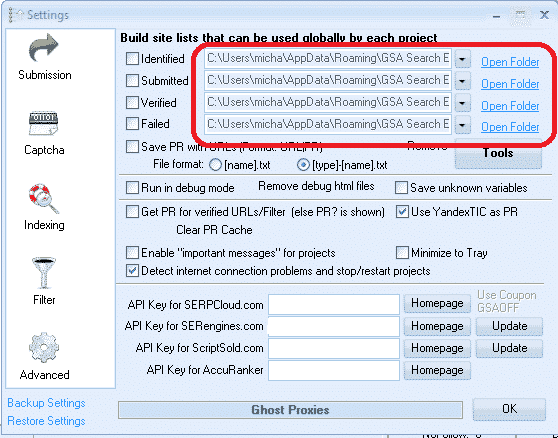
Location of the global site list
Location of the global site list folders


How to use paid link list shared via Dropbox from several providers, as well as your own list?

Many Tagapagraranggo ng Search Engine ng GSA users subscribe to paid link list, such as our own Asia Virtual Solutions Quality link list, which has a identified and a verified link list, and there are other list providers such as Auto Approve Market Place, SER Verified List and many others, and many of these list providers share there link list via Dropbox.

So what u will need to do is install Dropbox on your computer or your GSA SER VPS, then use any of the 4 slots in the GSA SER global site list to load your list.

You don't have to worry about the fact that it is called Identified, Submitted, Verified or Failed, in fact you can totally ignore the names as it has no meaning if you don't plan to check the boxes and write to the list. So have a look at the below screenshot of a set up using 4 different list.
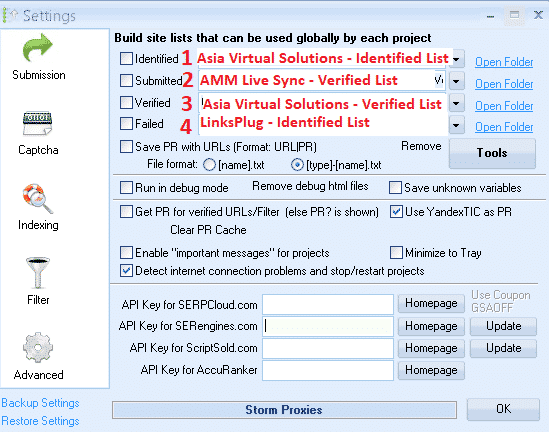
 

Using 4 Different List IN GSA SER Global list
Using 4 Different List in GSA SER Global link list


In the above screenshot all of the 4 list are shared with me via Dropbox, so all i did was click on the dropdown button and then navigate where that Dropbox folder is on my VPS PC

  1. In position no.1 I used the Mga Virtual na Solusyon sa Asya – Identified Link list
  2. In position no.2 I used the AAM Live Sync Verified link list
  3. In position no.3 I used the Asia Virtual Solutions – Verified Link List
  4. In position no.4 I have used the List from LinksPlug

If you maybe want to also have your own list then you simply need to use one of the 4 slots – just browse to the folder where your list is located.


GSA Search Engine Ranker – How To Use Multiple GSA SER Link List at Same Time


How do you set your GSA Search Engine Ranker projects to use the global site list

When you create your projects you select to use the  Global Site list in the project options, like in the below screenshot.

You check the box to use the slot where your list is added. So if you are using several site list from several providers and you have added them as i showed you earlier on then in the project options you select Identified, Submitted, Verified or Failed if your list are in those slots. Your project will then pull the links from the list you have selected to use.

If you order our GSA Search Engine Ranker Data Packs then we by default check the Global site list for you like in the below screenshot.

How do you set your projects to use the global site list


How to use GSA Search Engine Ranker Global Site List in Your GSA SER Projects


What is the difference between GSA Search Engine target URLs and the global site list.

  • GSA Search Engine Ranker global site list

Global site list are list that you can use for any niche and any GSA SER project, they are just general list not scraped for a specific niche. Link list that you buy our subscribe to are all global site list.

  • GSA Search Engine Ranker  target URLs

Target URLs are links that are scraped for a specific project and the links are all relevant to a niche or topic. So you will use your scraper like GScraper or Scrapebox or any others and then bind keywords to the footprints, so the results all have content or titles related to the keyword.

Target URLs are not usually added to the global site list but they are added to the project for which the URLs were scraped, like in the below screenshot.

Target URLs can be imported as .txt or .sl format

How to import GSA Search Engine Ranker target URLs
How to import GSA SER Target URLs


Well that's it, I hope that this article has given you a better understanding about the GSA Search Engine Global Site list and how to correctly use it to get the most out of your GSA SER projects.

It is very important to have a good site list, and Mga Virtual na Solusyon sa Asya can help you with that as well, out Quality Link list is not only the biggest GSA format link list available on the internet, but it is also very good quality and we make use of it our self on a daily basis. Have a look below for more a link to more info on our quality global link list.

Asia Virtual Solutions – GSA SER Global Link List

Do you want to start using the best Tagapagraranggo ng Search Engine ng GSA Global Link List Available On The Internet?
Check Out Our Great Global Link Lis

Mga Tag: Global Site ListGSA Global Site Listgsa search enginetaga-ranggo ng search engine ng gsaGSA Search Engine Ranker Global Site Listgsa ser global site listhow toHow To Correctly Use GSA Search Engine Rankersite list
Nakaraang Post

GDPR: Pag-decode ng hype at pagtiyak ng pagsunod

Susunod na Post

Asia Virtual Solutions – Social Signals Service Updated – Boost Your SEO with Social Signals

Michael Swart

Michael Swart

Ang Asia Virtual Solutions ay pagmamay-ari at pinapanatili ni Michael Swart at ng isang pangkat ng mga dedikadong virtual assistant.

Susunod na Post
Social Signals Service - Updated

Asia Virtual Solutions - Social Signals Service Updated - Boost Your SEO with Social Signals

Inirerekomendang Produkto

Mga Kategorya ng Blog

  • Paglutas ng Captcha
  • Paglikha ng Nilalaman
  • Pag-scrape ng Nilalaman
  • Pag-ikot ng Nilalaman
  • Mga Tutorial at Gabay sa Pagbuo ng Link sa GSA Search Engine Ranker
  • Tagabasag ng Captcha ng GSA
  • Pag-host at Pag-optimize ng VPS
  • Paano
  • Balita sa mga Virtual na Solusyon sa Asya
  • Pagmemerkado sa web
  • Paano
  • Mga Tutorial sa Robot ng Pera
  • Balita sa mga Virtual na Solusyon sa Asya
  • Mga Inirerekomendang Review ng SEO Software
  • Bidyo
  • Mga Tutorial at Gabay sa Pagbuo ng Link sa GSA Search Engine Ranker
  • Mga Inirerekomendang Review ng SEO Software
  • Pagmemerkado sa Web
  • Xrumer & Xevil Techniques & Tutorials

Produkto na Kailangan Mo

Mga Kamakailang Review

  • Mga Social Bookmark ng Asia Virtual Solutions Social Bookmarking para sa Mas Mahusay na SEO at Mas Mataas na Trapiko
    Na-rate 5 mula sa 5
    ni shashwat asthana
  • Mga email pack ng RankerX Mga Pakete ng Email ng RankerX
    Na-rate 5 mula sa 5
    ni vancuoc29
  • Advertisement ng serbisyo sa digital marketing na nagtatampok ng mga tool at feature ng SEO tulad ng mga proyekto ng GSA SER, mga pribadong email, at mga artikulong may kaugnayan sa keyword. Mga Proyekto sa GSA Search Engine Ranker - Tapos na Para Sa Iyo
    Na-rate 5 mula sa 5
    ni Nick Smith
  • GSA Search Engine Ranker VPS GSA Search Engine Ranker VPS
    Na-rate 5 mula sa 5
    ni Nick Smith
  • GSA Search Engine Ranker VPS GSA Search Engine Ranker VPS
    Na-rate 5 mula sa 5
    ni Mike
  • Nakabalangkas na Nilalaman, mga site na DA50+ Web 2.0 Post na may Structured Content sa mga DA50+ site
    Na-rate 5 mula sa 5
    ni ADE YUSUP
  • Nakabalangkas na Nilalaman, mga site na DA50+ Web 2.0 Post na may Structured Content sa mga DA50+ site
    Na-rate 5 mula sa 5
    ni Joseph Conroy
  • Nakabalangkas na Nilalaman, mga site na DA50+ Web 2.0 Post na may Structured Content sa mga DA50+ site
    Na-rate 5 mula sa 5
    ni N/AN/A
  • Mga Xevil Proxy Mga XEvil Proxies para sa napakabilis na paglutas ng ReCaptcha - Binoto bilang No.1
    Na-rate 5 mula sa 5
    ni Talbert Williams
  • Advertisement ng serbisyo sa digital marketing na nagtatampok ng mga tool at feature ng SEO tulad ng mga proyekto ng GSA SER, mga pribadong email, at mga artikulong may kaugnayan sa keyword. Mga Proyekto sa GSA Search Engine Ranker - Tapos na Para Sa Iyo
    Na-rate 5 mula sa 5
    ni Sunil Keshari

Lahat ng Legal na Bagay

  • Kasunduan sa Kaakibat
  • Antispam
  • Mga kagustuhan sa komunikasyon
  • Pagtatanggi
  • Dobleng I-click na Dart Cookie
  • Patakaran sa mga Panlabas na Link
  • Patakaran sa Facebook
  • Pahayag ng FTC
  • Patakaran sa Pagkapribado
  • Patakaran sa Pag-refund at Garantiya
  • Mga Tuntunin at Kundisyon
  • Pagsisiwalat ng mga Testimonial

Ligtas na Pamimili

Sertipikado ang Pag-browse sa Google Save
Ang logo ng website na Norton Safe sa puting background.

Makipag-ugnayan sa Amin

Pangunahing Tanggapan ng Estados Unidos
  • Asia Virtual Solutions LLC, 400 Rella Blvd, #123-298, Montebello, NY 10901
  •  kasama*****@******************ns.com
  • +1 (415) 851-6951
  •  asiavirtual
  •  Asia Virtual Solutions sa LinkedIn
Asya Virtual Office
  • Asia Virtual Solutions LLC, Palapag 29, Ang mga Opisina sa Centralworld 999/9 Rama I Road, Pathumwan, Bangkok, Thailand
  •  kasama*****@******************ns.com
  • +1 (415) 851-6951
  •  asiavirtual
  •  Asia Virtual Solutions sa LinkedIn

© 2026 - Asia Virtual Solutions LLC. Lahat ng Karapatan ay Nakalaan. Ang website ay Pinapatakbo at Pinapanatili Ng: Asia Virtual Solutions LLC

Walang thumbnail
Na-upload
Nabigo
Alisin ang na-upload na file
Walang Resulta
Tingnan ang Lahat ng Resulta
  • Tahanan
  • Tagapagraranggo ng Search Engine ng GSA
    • Mga Madalas Itanong (FAQ) para sa GSA Search Engine Ranker
    • Mga Kagamitan at Add-On ng GSA SER
    • Mga Gabay sa Pagraranggo ng Search Engine ng GSA
    • Gabay sa Pagbasag ng Captcha ng GSA
    • Pagho-host ng GSA
  • Blog
    • Paglutas ng Captcha
    • Paglikha ng Nilalaman
    • Pag-scrape ng Nilalaman
    • Pag-ikot ng Nilalaman
    • Mga Tutorial at Gabay sa Pagbuo ng Link sa GSA Search Engine Ranker
    • Mga Serbisyo sa Pagho-host ng VPS
    • Mga Tutorial sa Robot ng Pera
    • Paano
    • Balita sa mga Virtual na Solusyon sa Asya
    • Mga Inirerekomendang Review ng SEO Software
    • Pagmemerkado sa Web
    • Xrumer & Xevil Techniques & Tutorials
  • Tindahan
    • Mga Artikulo sa Nilalaman at AI
    • Mga Kagamitan at Add-On ng GSA SER
    • Mga Serbisyo sa Pagho-host
    • Mga Serbisyo sa Pagbuo ng Link
    • Tagapagsumite ng Robot ng Pera
    • RankerX
    • Mga Inirerekomendang Serbisyo
    • Mga Serbisyo sa Social Media
    • Mga Serbisyo ng Xrumer

© 2026 - Asia Virtual Solutions LLC. Lahat ng Karapatan ay Nakalaan. Ang website ay Pinapatakbo at Pinapanatili Ng: Asia Virtual Solutions LLC

Tagalog
English 简体中文 हिन्दी Bahasa Indonesia 日本語 한국어 Bahasa Melayu Русский ไทย Tiếng Việt