


Kiat pemeliharaan untuk Pemeringkat Mesin Pencari GSA
GSA Search Engine Ranker adalah salah satu alat pembuatan tautan otomatis "all in one" terbaik yang tersedia untuk pemasar web, tetapi sayangnya, alat ini tidak melakukan pekerjaan pembersihan sisa-sisa proses dengan baik. Oleh karena itu, Anda harus membersihkan sisa-sisa proses GSA Search Engine Ranker untuk memastikan hard disk Anda tidak penuh dan untuk memastikan GSA SER Anda berjalan optimal. Berikut adalah beberapa hal penting yang perlu diperhatikan. Tips perawatan untuk GSA Alat pemeringkat mesin pencari yang sebaiknya Anda coba dan lakukan setidaknya sekali seminggu.
- Daftar Tautan Global
- Ping Situs
- URL Target Proyek
- Akun Proyek Mati yang Tidak Digunakan
- URL Terverifikasi Proyek
Daftar Tautan Global
Jika Anda menggunakan daftar berbayar yang dibagikan melalui Dropbox, Anda dapat melewati bagian ini, karena semua daftar berbayar sudah tersedia. daftar tautan yang dibagikan melalui Dropbox biasanya hanya dapat dibaca (read-only), jadi Anda tidak akan dapat mengubahnya.
The daftar situs global Ini adalah bagian pertama di bawah tab lanjutan. Di sinilah Anda biasanya mengimpor daftar baru yang telah Anda kumpulkan atau mungkin daftar yang telah Anda beli. Selain itu, jika Anda telah mencentang kotak centang di sebelah setiap opsi, maka GSA akan terus menambahkan ke daftar saat Anda membuat postingan atau saat memverifikasi tautan, bahkan akan menulis ke daftar yang gagal jika Anda mencentang opsi tersebut.
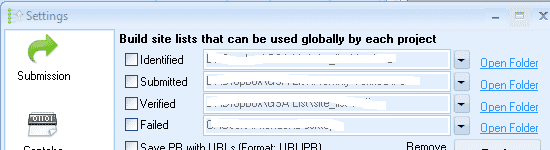
Mengapa Anda ingin membersihkan daftar situs global?
Daftar ini akan menjadi berantakan seiring waktu karena Pemeringkat Mesin Pencari GSA Program ini tidak memeriksa apakah tautan sudah ada dalam daftar. Sebaliknya, program ini terus menambahkan tautan ke daftar, dan hasilnya adalah hard drive Anda akan cepat penuh, dan yang lebih buruk lagi adalah GSA Search Engine Ranker akan melambat karena daftar tersebut sudah penuh dengan duplikat sehingga harus bekerja lebih keras untuk mencari tautan baru.
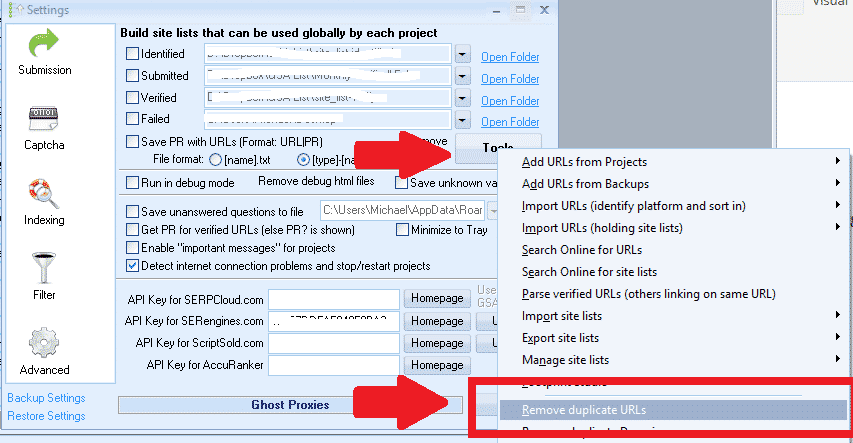
Bersihkan Daftar Situs Global Ini sederhana; silakan ikuti langkah-langkah berikut:
- Pergi ke Pengaturan
- Klik pada Tab Lanjutan
- Klik pada Peralatan
- Gulir ke bawah dan pilih: Hapus URL Duplikat
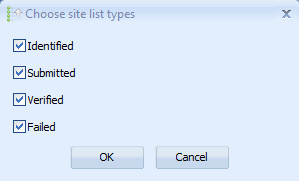
- Jendela pop-up akan muncul menanyakan daftar mana yang ingin dibersihkan: Pilih semuanya
Ping Situs
Tidak banyak orang yang menggunakan situs ping karena mereka lebih memilih pengindeks berbayar. Namun, jika Anda memang menggunakan ping, Anda harus menghapus situs yang terus gagal, karena hal itu akan memperlambat situs Anda dan meningkatkan penggunaan sumber daya jika GSA Search Engine Ranker terus menerus mencoba melakukan ping ke situs ping yang sudah mati atau tidak berfungsi.
Untungnya, membersihkan bangkai hewan itu mudah, karena Pemeringkat Mesin Pencari GSA Ini akan membantu kita. Pastikan Anda melakukannya SEBELUM memperbarui atau memulai ulang h=GSA SER karena jika tidak, GSA ser Ini akan mereset statistik, dan Anda tidak akan tahu mana yang gagal, dan Anda perlu menjalankannya kembali untuk beberapa waktu.
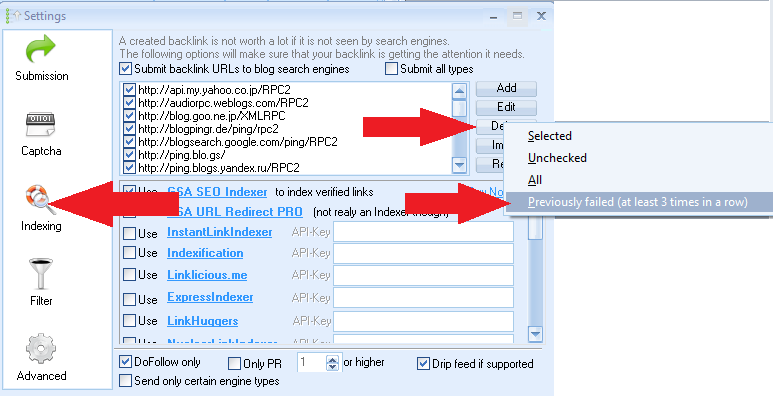
Membersihkan situs ping sangat mudah; ikuti langkah-langkah berikut:
- Pergi ke Pengindeksan bagian
- Klik pada Menghapus
- Memilih: Sebelumnya gagal (setidaknya tiga kali berturut-turut)
URL Target Proyek
URL target proyek adalah salah satu penyebab masalah terbesar terkait duplikasi dan dengan cepat memenuhi hard drive Anda. Anda mungkin bertanya-tanya apa URL ini dan dari mana asalnya.
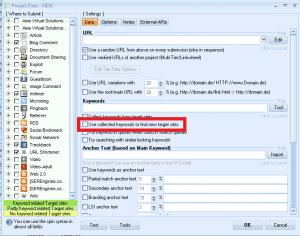
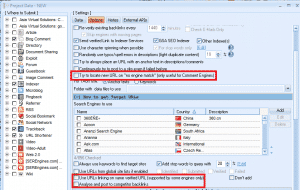
Pendeknya, URL target Tautan-tautan tersebut telah ditambahkan ke proyek Anda, baik oleh Anda sendiri (diimpor) atau oleh GSA Search Engine Ranker; jika Anda telah memilih untuk mencari lebih banyak URL atau jika Anda menggunakan opsi mesin pencari untuk mengikis target, maka tautan-tautan tersebut akan disimpan dalam proyek Anda sebagai URL target. Itu semua bagus, tetapi sayangnya, GSA SER tidak melakukan pekerjaan yang baik di sini karena terus menambahkan tautan ke daftar tanpa terlebih dahulu memeriksa apakah tautan tersebut mungkin sudah ada dalam daftar.
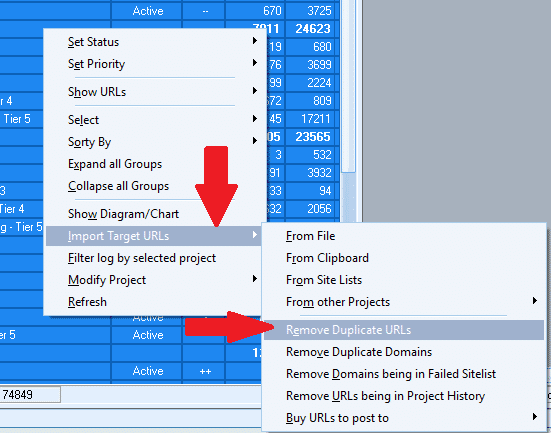
Gambar-gambar di bawah ini adalah filter yang menyebabkan daftar menjadi lebih panjang.
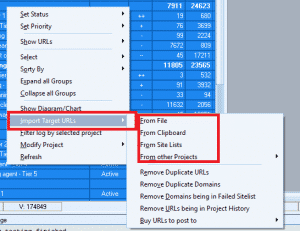
Membersihkan URL Target sangat mudah; ikuti langkah-langkah berikut:
- Sorot semua proyek Anda.
- Klik kanan di mana saja di jendela proyek.
- Memilih: Impor URL Target
- Kemudian gulir ke bawah: Hapus URL Duplikat
- Tunggu hingga selesai. Jika Anda memiliki banyak proyek, ini bisa memakan waktu cukup lama, jadi mungkin mulailah sebelum Anda makan siang atau tidur malam.
- Setelah selesai, akan terlihat berapa banyak duplikat yang telah dihapus.
Akun Proyek Mati yang Tidak Digunakan
Saat Anda menjalankan Proyek Peringkat Mesin Pencari GSA, sistem ini terus berusaha membuat akun di platform yang telah Anda pilih. Saat membuat akun, GSA Search Engine Ranker menyimpan semua informasi bersama akun tersebut, seperti detail login, Email yang digunakan, Tanggal pembuatan, dan lain sebagainya. Sayangnya, seiring waktu, beberapa akun ini berhenti berfungsi karena berbagai alasan, seperti akun tidak terverifikasi, akun dihentikan oleh pemiliknya, situs tidak ada, atau alasan lain. Sayangnya, ketika akun tidak lagi berfungsi, informasi yang tersimpan di dalamnya tetap ada, memakan ruang penyimpanan, dan juga memperlambat pengiriman Anda karena GSA Search Engine Ranker akan terus mencoba memposting ke akun yang sudah tidak aktif ini.
Kabar baiknya adalah bahwa Pemeringkat Mesin Pencari GSA Kami dapat memberi tahu Anda akun mana yang tidak aktif dan tidak digunakan, tetapi Anda harus menginstruksikan GSA SER untuk menghapus akun yang tidak aktif dan tidak digunakan tersebut.
Menghapus akun yang tidak aktif dan tidak digunakan akan mempercepat pengiriman Anda dan sedikit mengurangi ruang yang terpakai.
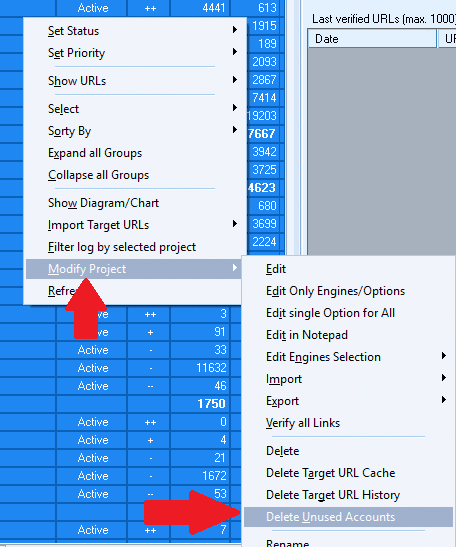
Membersihkan akun proyek yang sudah tidak aktif dan tidak digunakan itu mudah; ikuti langkah-langkah berikut:
- Sorot semua proyek Anda
- Klik kanan di mana saja di jendela proyek.
- Memilih: Memodifikasi Proyek
- Kemudian gulir ke bawah Hapus Akun yang Tidak Digunakan
- Tunggu hingga selesai; ini akan memakan waktu beberapa menit, tergantung berapa banyak proyek yang Anda miliki.
- Setelah selesai, ini akan menunjukkan kepada Anda berapa banyak akun mati yang tidak terpakai telah dihapus.
URL Terverifikasi Proyek
URL Terverifikasi Proyek adalah URL yang Pemeringkat Mesin Pencari GSA telah menciptakan dan yang pada suatu titik telah diverifikasi. Sayangnya, seiring waktu beberapa Tautan akan dimoderasi, dan pemilik situs akan menghapus tautan yang harus dibuat oleh GSA SER. untuk Anda atau berbagai alasan. Tautan tersebut sudah tidak tersedia lagi. Namun, GSA SER belum memeriksanya kembali untuk melihat apakah tautan tersebut sudah tidak terverifikasi lagi.
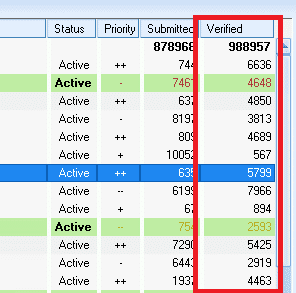
Tautan terverifikasi yang sudah mati sangat merugikan Anda, terutama jika Anda membangun proyek bertingkat karena Anda akan membuang waktu dan sumber daya untuk membuat tautan ke tautan terverifikasi yang sudah mati, sebuah pemborosan waktu yang sia-sia.
Salah satu cara untuk memastikan semua tautan proyek Anda masih terverifikasi adalah dengan melakukan pengecekan ulang paksa pada URL. Perlu diingat bahwa jika Anda memiliki banyak proyek, proses ini dapat memakan waktu, jadi saya sarankan untuk memulai pengecekan sebelum tidur dan membiarkannya berjalan hingga selesai. Manfaat dari pengecekan ulang tautan terverifikasi Anda adalah Anda akan mendapatkan hasil yang lebih baik, karena tingkatan yang lebih rendah hanya akan membuat tautan ke tautan terverifikasi yang masih berfungsi.
Untuk membersihkannya dan memverifikasi ulang tautan relatif mudah; silakan ikuti langkah-langkah berikut:

- Sorot semua proyek Anda
- Klik kanan di mana saja di jendela proyek.
- Memilih: Tampilkan URL
- Kemudian gulir ke bawah dan pilih: Terverifikasi (Diperlukan beberapa waktu untuk memuat semua URL (harap bersabar))
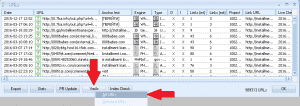
- Setelah dimuat, pilih: Memeriksa kemudian Semua URL
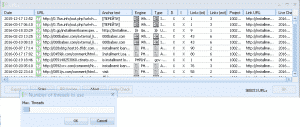
- Selanjutnya, pilih Jumlah Utas (Pilih sebanyak mungkin, biasanya jumlah yang sama dengan jumlah yang Anda gunakan saat menjalankan GSA Ser Anda).
- Proses akan segera dimulai, dan Anda dapat melihat bilah kemajuan. Tergantung pada berapa banyak tautan yang harus Anda periksa, proses ini biasanya membutuhkan waktu lama, jadi sebaiknya lakukan di malam hari.
- Setelah selesai, akan muncul jendela pop-up dan menampilkan sebuah pilihan: Hapus Verifikasi yang Gagal – Saya biasanya memilih untuk menghapus keduanya gagal dan waktu habis verifikasi.

Tips perawatan penting untuk GSA Search Engine Ranker – Kesimpulan
Melakukan hal-hal ini pemeliharaan Melakukan langkah-langkah ini setidaknya sekali seminggu akan memastikan Anda tidak menggunakan ruang hard disk yang tidak perlu. Yang terpenting, Anda akan memastikan bahwa... Pemeringkat Mesin Pencari GSA Berjalan lancar dan tidak terhambat oleh masalah kehabisan memori, URL atau akun yang mati dan duplikat.
Beri tahu saya jika Anda memerlukan klarifikasi lebih lanjut mengenai langkah-langkah di atas.













 English
  বাংলা
বাংলা  简体中文
简体中文  Nederlands
  Français
  Deutsch (Sie)
  हिन्दी
  Bahasa Indonesia
  Italiano
  日本語
日本語  한국어
한국어  Bahasa Melayu
  Português do Brasil
  Русский
  Español de México
  Tagalog
  ไทย
ไทย  Tiếng Việt
  اردو
اردو  Türkçe