


Promociona un feed RSS con el clasificador de motores de búsqueda de GSA.
La mayoría de los usuarios de GSA Search Engine Ranker solo promocionan enlaces de sus proyectos que tienen en una lista o copian de sus sitios web, o tal vez enlaces de otro proyecto, lo cual está bien, pero no mucha gente se da cuenta de que hay muchas maneras diferentes de promocionar enlaces con GSA Search Engine Ranker.
Diferentes formas de importar tus enlaces al clasificador del motor de búsqueda de GSA
- La forma habitual, que es la que utilizan la mayoría de los usuarios, es copiar o importar desde un archivo.
- Importar desde una fuente RSS
- Importar desde un mapa del sitio
- Rastrea un sitio

En esta publicación veremos cómo agregar su feed RSS a Clasificador de motores de búsqueda de GSA y también explorar diferentes tipos de URL de feeds que se pueden usar para promocionar sus sitios.
Cómo crear un proyecto GSA usando una URL de feed
Crear un proyecto usando una URL de fuente RSS es realmente muy sencillo. A continuación, te explicaré los pasos.
- Crea tu proyecto como lo harías normalmente, añadiendo todo el contenido y el texto de anclaje, y seleccionando las plataformas, pero aún no añadas ninguna URL.
- Bajo el Pestaña Datos , La primera opción que ves es la opción URL, y aquí es donde normalmente importarías tus URL, pero para un proyecto de fuente RSS no agregas URL, sino que agregas la URL de tu fuente RSS.
- A la derecha del campo URL verá un pequeño botón que dice EDITAR, haga clic en él y seleccione la opción: Agregar fuente RSS (usa
y <link>)</li> <li>A continuación, pegue la URL de una única fuente RSS en el cuadro y haga clic en Aceptar, como se muestra en la siguiente captura de pantalla.</li> <li>Y eso es todo, ahora puedes guardar tu proyecto y <a class="wpil_keyword_link" href="https://asiavirtualsolutions.com/es/investigacion-de-palabras-clave-de-la-manera-correcta/" target="_blank" rel="noopener" title="Aprende a realizar una investigación de palabras clave de la manera correcta." data-wpil-keyword-link="linked" data-wpil-monitor-id="23173">GSA SER</a> Extraerá automáticamente la URL y el título de tu feed.</li> </ol> <figure id="attachment_117551" aria-describedby="caption-attachment-117551" style="width: 750px" class="wp-caption aligncenter"><img decoding="async" class="size-publisher-lg wp-image-117551" src="https://asiavirtualsolutions.com/wp-content/uploads/2022/01/Adding-a-RSS-Feed-in-GSA-Search-Engine-Ranker-750x303.png" alt="Agregar un feed RSS en GSA Search Engine Ranker" width="750" height="303" title="Cómo promocionar un feed RSS con GSA Search Engine Ranker 3" srcset="https://asiavirtualsolutions.com/wp-content/uploads/2022/01/Adding-a-RSS-Feed-in-GSA-Search-Engine-Ranker-750x303.png 750w, https://asiavirtualsolutions.com/wp-content/uploads/2022/01/Adding-a-RSS-Feed-in-GSA-Search-Engine-Ranker-545x219.png 545w, https://asiavirtualsolutions.com/wp-content/uploads/2022/01/Adding-a-RSS-Feed-in-GSA-Search-Engine-Ranker-300x120.png 300w, https://asiavirtualsolutions.com/wp-content/uploads/2022/01/Adding-a-RSS-Feed-in-GSA-Search-Engine-Ranker-600x241.png 600w, https://asiavirtualsolutions.com/wp-content/uploads/2022/01/Adding-a-RSS-Feed-in-GSA-Search-Engine-Ranker-200x80.png 200w" sizes="(max-width: 750px) 100vw, 750px"><figcaption id="caption-attachment-117551" class="wp-caption-text">Agregar un feed RSS en GSA Search Engine Ranker</figcaption></figure> <p> </p> <h3><span id="What-will-GSA-Import-from-the-feed-URL-and-how-often"><strong>¿Qué importará GSA de la URL del feed y con qué frecuencia?.</strong></span></h3> <h4></h4> <h4><span id="What-will-GSA-import-from-the-Feed-URL"><strong>¿Qué importará GSA desde la URL del feed?</strong></span></h4> <p>Como se muestra en el botón de edición donde agregaste la fuente, lo único que GSA SER importará de tus fuentes RSS es la fuente RSS. <span style="color: #ff0000"><strong>títulos de las publicaciones</strong></span> y el <strong><span style="color: #ff0000">URLs de publicaciones</span></strong>.Tenga en cuenta que GSA NO importará el contenido del feed.</p> <p>Si observa la siguiente captura de pantalla del canal RSS de <a class="wpil_keyword_link" href="https://asiavirtualsolutions.com/es/mega-venta-de-fin-de-ano/" target="_blank" rel="noopener" title="Megaventa de fin de año de Asia Virtual Solutions" data-wpil-keyword-link="linked" data-wpil-monitor-id="22318">Asia Virtual</a> Las soluciones las verás donde he resaltado el feed RSS. <span style="color: #ff0000"><strong>títulos de las publicaciones</strong></span> y el <strong><span style="color: #ff0000">URLs de publicaciones </span></strong>GSA importará el contenido. La cantidad de títulos y URL que importará dependerá de cuántos aparezcan en tu feed. (Más adelante en esta publicación, te daré algunos consejos para aumentar la cantidad de publicaciones que se muestran en tu feed).</p> <figure id="attachment_117555" aria-describedby="caption-attachment-117555" style="width: 1555px" class="wp-caption aligncenter"><img loading="lazy" decoding="async" class="wp-image-117555 size-full" src="https://asiavirtualsolutions.com/wp-content/uploads/2022/01/What-will-GSA-SER-import-from-the-Feed-URL-e1643017683864.png" alt="¿Qué importará GSA SER desde la URL del feed?" width="1555" height="1011" title="Cómo promocionar un feed RSS con GSA Search Engine Ranker 4" srcset="https://asiavirtualsolutions.com/wp-content/uploads/2022/01/What-will-GSA-SER-import-from-the-Feed-URL-e1643017683864.png 1555w, https://asiavirtualsolutions.com/wp-content/uploads/2022/01/What-will-GSA-SER-import-from-the-Feed-URL-e1643017683864-545x354.png 545w, https://asiavirtualsolutions.com/wp-content/uploads/2022/01/What-will-GSA-SER-import-from-the-Feed-URL-e1643017683864-300x195.png 300w, https://asiavirtualsolutions.com/wp-content/uploads/2022/01/What-will-GSA-SER-import-from-the-Feed-URL-e1643017683864-1024x666.png 1024w, https://asiavirtualsolutions.com/wp-content/uploads/2022/01/What-will-GSA-SER-import-from-the-Feed-URL-e1643017683864-768x499.png 768w, https://asiavirtualsolutions.com/wp-content/uploads/2022/01/What-will-GSA-SER-import-from-the-Feed-URL-e1643017683864-600x390.png 600w, https://asiavirtualsolutions.com/wp-content/uploads/2022/01/What-will-GSA-SER-import-from-the-Feed-URL-e1643017683864-200x130.png 200w, https://asiavirtualsolutions.com/wp-content/uploads/2022/01/What-will-GSA-SER-import-from-the-Feed-URL-e1643017683864-1536x999.png 1536w, https://asiavirtualsolutions.com/wp-content/uploads/2022/01/What-will-GSA-SER-import-from-the-Feed-URL-e1643017683864-210x136.png 210w" sizes="(max-width: 1555px) 100vw, 1555px"><figcaption id="caption-attachment-117555" class="wp-caption-text">¿Qué importará GSA SER desde la URL del feed?</figcaption></figure> <p> </p> <h4><span id="What-will-GSA-SER-use-as-the-anchor-text-when-creating-a-RSS-feed-post"><strong>¿Qué texto utilizará GSA SER como texto de anclaje al crear una publicación de fuente RSS?</strong></span></h4> <p>Por defecto, GSA Search Engine Ranker utilizará el título de la publicación del feed RSS como texto de anclaje; sin embargo, si el título de la publicación del feed es más largo que 3 palabras, no utilizará el título del feed como texto de anclaje, sino que utilizará aleatoriamente un texto de anclaje que haya agregado en el campo de texto de anclaje en su <a class="wpil_keyword_link" href="https://asiavirtualsolutions.com/es/paquete-de-datos-de-nivel-1-del-clasificador-de-motores-de-busqueda-de-gsa/" target="_blank" rel="noopener" title="Paquete de datos de nivel 1 del clasificador de motores de búsqueda de GSA" data-wpil-keyword-link="linked" data-wpil-monitor-id="22862">Proyecto GSA SER</a>.</p> <p>Por ejemplo, en la captura de pantalla anterior donde mostré los títulos de las publicaciones del feed RSS y las URL de las publicaciones, el título de mi primera publicación se veía así:;</p> <div class="bs-shortcode-alert alert alert-info" style="text-align: center"><title>El mejor planificador de marketing para las fiestas de 2022
https://asiavirtualsolutions.com/marketing-planner-2022/
En mi caso, el título de mi feed RSS es: El mejor planificador de marketing para las fiestas de 2022, que son 7 palabras. Por lo tanto, esto es demasiado largo y GSA SER ignorará el título de la fuente RSS y utilizará un texto de anclaje aleatorio del campo de texto de anclaje, que se muestra en la imagen siguiente.

Por otro lado, si el título de mi publicación fuera algo como lo siguiente, que solo tiene 3 palabras, entonces habría usado "Mejor planificador de marketing" como texto de anclaje.
Aspectos a tener en cuenta al crear un proyecto de feed GSA SER:
Si tienes un sitio de WordPress o un sitio que no se actualiza con regularidad, tu feed RSS tampoco se actualizará y los enlaces no cambiarán hasta que publiques en tu sitio. Por lo tanto, te conviene ajustar la frecuencia de publicación de tu proyecto GSA SER. A continuación, encontrarás algunas configuraciones en GSA Search Engine Ranker que puedes usar para reducir la frecuencia de publicación. Recuerda que los feeds RSS son para uso a largo plazo, así que puedes crearlos para complementar tus proyectos habituales.
Los proyectos de feeds son ideales para publicar actualizaciones periódicas de forma gradual.
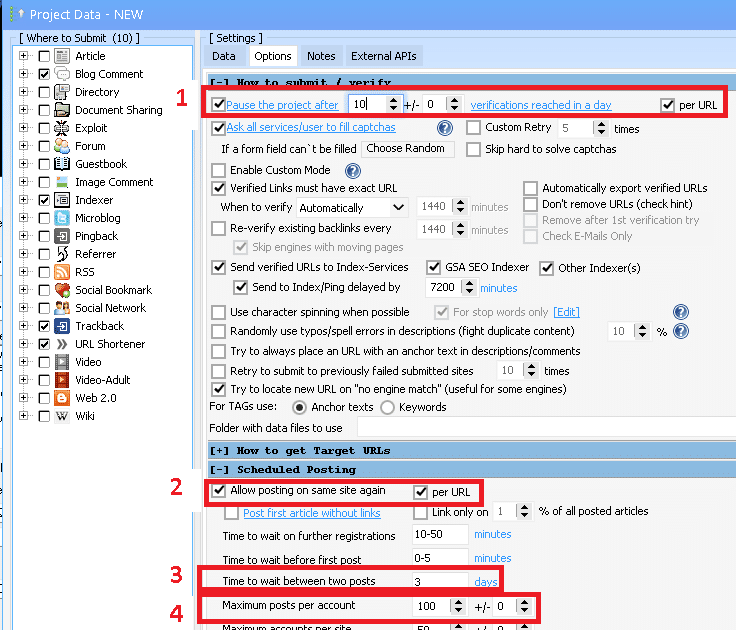
La configuración anterior dependerá en gran medida de tu fuente de noticias; hay fuentes que se actualizan diariamente y otras que se actualizan semanal o mensualmente, por lo que realmente debes ajustar la configuración en función de la frecuencia con la que se actualizan tus fuentes.
Lo siguiente se basa en mi sitio web, que se actualiza aproximadamente una vez por semana o una vez al mes. Por lo tanto, mi feed contiene 15 enlaces que se actualizan cada semana, más o menos:
- Como no necesito crear muchos enlaces rápidamente, configuré esto para que el proyecto se pause cuando alcance los 10 enlaces verificados en un día. De esa manera, aumentas tu visibilidad de forma natural.
- Sin duda, te conviene volver a publicar en los mismos sitios para que tus futuros enlaces RSS también tengan mayor visibilidad. Asegúrate de tener mucho contenido y de que la sintaxis sea correcta.
- Como mi feed se actualiza solo una vez por semana, quiero espaciar mis publicaciones. Así que publicamos la primera y luego esperamos 3 días para publicar la siguiente. Si tu sitio tiene mucho tráfico y tu feed se actualiza con frecuencia, cambiaré el intervalo a cada pocas horas.
- ¿Por qué limitarse a unas pocas publicaciones por cuenta? Voy a establecer este número alto para poder publicar todo mi contenido futuro en una sola cuenta. Además, si tienes que crear cuentas constantemente, te costará tiempo y dinero, ya que tendrás que resolver captchas y usar recursos.
¿Qué fuentes RSS puedes obtener de tu sitio WordPress?.
La mayoría de la gente piensa erróneamente que solo tiene un feed del sitio; a continuación, se muestran 5 feeds que puede obtener de su sitio WooCommerce/WordPress.
- Fuente del blog o fuente principal
- Feed de comentarios del blog
- Fuentes de categorías del blog
- Productos de la tienda feed
- Feeds de categorías de productos de la tienda
Dónde encontrar los feeds RSS en tu sitio de WordPress:
Veamos de dónde obtendrás estos feeds. Yo usaré mi propio sitio web para los ejemplos.
- El feed del blog o feed principal normalmente es la dirección de su sitio y mostrará su última publicación del blog. https://asiavirtualsolutions.com/feed/
- El feed de comentarios del blog contiene todos los comentarios que se hicieron en tu publicación; no lo uso mucho. https://asiavirtualsolutions.com/comments/feed/
- Feeds de categorías del blog: simplemente selecciona cualquier categoría de tu blog. En mi opinión, este es el mejor feed porque puedes usar contenido y texto de anclaje más específicos. https://asiavirtualsolutions.com/category/gsa-search-engine-ranker/feed/
- Feed de productos de la tienda: si tienes una página de tienda de WooCommerce, entonces tienes un feed de página de tienda. https://asiavirtualsolutions.com/shop/feed/
- Feeds de categorías de productos de la tienda: si tienes una tienda WooCommerce, puedes navegar a una categoría de la tienda y obtener el feed RSS. Al igual que con la categoría del blog, este es el mejor feed para usar, ya que puedes usar contenido dirigido y texto de anclaje basado en lo que tienes en la categoría de la tienda. https://asiavirtualsolutions.com/product-category/gsa-products-services/feed/
Cómo aumentar el número de publicaciones vistas en tu feed de WordPress:
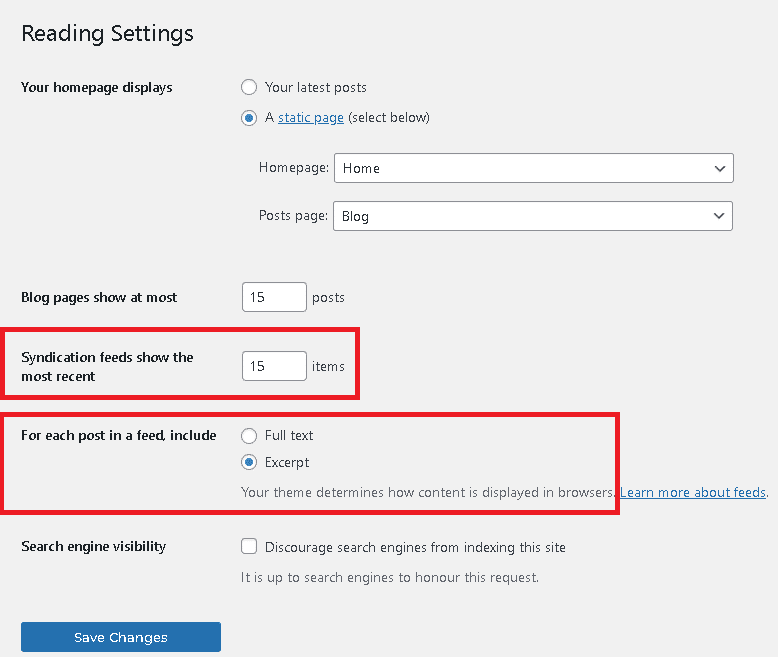
¿Sabías que puedes controlar la cantidad de entradas que se muestran en tu feed RSS de WordPress? Simplemente sigue los pasos a continuación.
- En el menú de administración de WordPress, desplácese hacia abajo hasta Ajustes y ampliarlo. .
- Haz clic en Leer
- Luego, desplácese hacia abajo hasta la sección que dice: Las fuentes de sindicación muestran las más recientes
- El valor predeterminado suele ser 1, puedes aumentarlo al valor que desees aquí. Normalmente tengo El mío está configurado en 15.. Cuanto mayor sea el número, más recursos se utilizarán para cargar la lista, así que no lo configures con un valor descabellado como 100.
- Justo debajo de esa última configuración, verá otra opción: Para cada publicación en un feed, incluya
- Texto completo: esto mostrará el contenido completo de la publicación del blog en el feed.
- Extracto – Esto solo mostrará un breve extracto de tu publicación.
- Te recomiendo que lo configures en espectáculo Extracto, especialmente si solo lo va a usar para la publicación del feed RSS de GSA Search Engine Ranker, que solo utilizará el título y el enlace de la publicación, y no el contenido o extracto.
Cómo encontrar tus feeds RSS
A veces puede ser un poco difícil tratar de averiguar qué es exactamente tu feed RSS o dónde encontrarlo. En mi caso, en realidad estaba buscando una herramienta que me ayudara a encontrar feeds que pudiera usar en mi blogs de automóviles.
Una herramienta práctica que encontré y que ahora uso con frecuencia es una pequeña extensión de Google Chrome llamada “Obtener la URL del feed RSS“.Puedes verlo en la tienda de Google Chrome aquí: https://chrome.google.com/webstore/detail/get-rss-feed-url/kfghpdldaipanmkhfpdcjglncmilendn
Cómo usar Obtener URL de fuente RSS
- Simplemente navegue hasta el sitio web del que desea conocer el feed.
- Haz clic en el Obtener la URL del feed RSS icono en la barra de su navegador.
- Mostrará las fuentes disponibles para esa página.
- Navegue hasta la página de la tienda y haga clic en el Obtener la URL del feed RSS Mostrará las fuentes de contenido disponibles para la tienda.
- Navegue hasta una categoría de blog o una categoría de tienda y haga clic en el Obtener la URL del feed RSS Mostrará las fuentes disponibles para esa categoría.
- La siguiente captura de pantalla es el resultado si navego a https://asiavirtualsolutions.com/

Cómo combinar varias fuentes de datos en una sola fuente.
Algunos usuarios tienen muchos sitios web sobre el mismo tema, o utilizan herramientas como Menterprise Publisher, que generan miles de subdominios y páginas web. En estos casos, crear un proyecto de feed de GSA Search Engine Ranker resulta poco práctico, ya que solo se puede especificar una URL de feed por proyecto. Pero no se preocupe, hay una solución; siga leyendo…
Existen muchos servicios, tanto de pago como gratuitos, que permiten combinar varias fuentes de noticias en una sola.
5 herramientas gratuitas para agregar RSS Combinar múltiples fuentes RSS en una sola
De los 5 agregadores RSS gratuitos mencionados anteriormente, mi favorito, que uso todo el tiempo, es RSS Mix. Te permite agregar hasta 100 feeds RSS y combinarlos en un solo feed. Lo uso todo el tiempo para combinar todos mis Editorial Menterprise Convierto las fuentes en fuentes de una sola categoría y luego utilizo la fuente RSS Mix en mi proyecto GSA SER Feed.
Utilizo RSS mix todo el tiempo para combinar todos mis feeds de categorías en mis subdominios de Menterprise y luego combinar cada 100 Empresa fuentes en un único feed, que luego puedo promocionar con el clasificador del motor de búsqueda GSA.
Creación de feeds RSS desde tus sitios de redes sociales y Web 2.0.
Creo que la mayoría, si no todas las personas que leen esta publicación, tienen al menos un sitio social, algunas tienen muchos sitios sociales y web 2.0 que utilizan como sitios de almacenamiento intermedio. Pero apuesto a que la mayoría me dirá que no es posible crear un feed para su página o grupo de Facebook, o que no se puede crear un feed de su Twitter y muchos más, pero créanme, es posible, como pueden ver en los feeds sociales de Asia Virtual Solutions que se muestran a continuación.
- Asia Virtual Solutions – Publicación de la página de Facebook – https://rss.app/feeds/7VzknyEoAU1Va0q0.xml
- Asia Virtual Solutions – Canal de Twitter – https://rss.app/feeds/QgFBQPOHAVxwOLmb.xml
- Asia Virtual Solutions – Canal de YouTube – https://rss.app/feeds/4I7b91OITFFrvQ8f.xml
- Asia Virtual Solutions – Canal de reproducción de YouTube – https://rss.app/feeds/AYjZK8Wg9fRy5d1Q.xml
- Asia Virtual Solutions – Canal RSS de Instagram – https://rss.app/feeds/KSKgt4X7I6hbsa22.xml
- Asia Virtual Solutions – Canal de Imgur – https://rss.app/feeds/0buV1PaXPKMoXDe7.xml
- Existen infinitas posibilidades para crear feeds; consulta el servicio que utiliza Asia Virtual Solutions a continuación.

Consideraciones finales sobre el feed RSS con el clasificador del motor de búsqueda de GSA
Como puede ver, existen muchas maneras de generar fuentes RSS, y puede generar una fuente RSS desde casi cualquier página. Crear proyectos de GSA utilizando fuentes RSS significa que tendrá enlaces y títulos de enlaces actualizados dinámicamente que se pueden enviar al clasificador del motor de búsqueda de GSA cada vez que las fuentes RSS se actualicen cada hora.
Te animo a crear un Proyecto GSA para cada una de las fuentes RSS que tengas o combínalas todas en una sola fuente con RSS Mix y crea una única publicación de GSA SER que se actualiza cada hora con contenido nuevo de la fuente.









 English
  বাংলা
বাংলা  简体中文
简体中文  Nederlands
  Français
  Deutsch (Sie)
  हिन्दी
  Bahasa Indonesia
  Italiano
  日本語
日本語  한국어
한국어  Bahasa Melayu
  Português do Brasil
  Русский
  Español de México
  Tagalog
  ไทย
ไทย  Tiếng Việt
  اردو
اردو  Türkçe